
v1.1
Released 5 October 2023
Changelog
- Dealerships can hire employees
- Employees can sell vehicles directly to customers; showroom can be disabled
- Sell vehicle back to the dealership
- Optional markers so dealership locations are easier to find
- Hide blips (set
hideBlip = true) within the dealership config - Restrict access to Dealership based on job or gang
- Open callback on client & server for restricting showroom access
- "Restore showroom" button for resetting display vehicles if they get messed up
- Vehicle sales now show name in Dealership Management
- Toggle financing per dealership
- Set new vehicle plate patterns + fix bug where plate would exist in DB
- Fix: okokTextUI spamming sound (fixed text ui being constantly re-rendered)
- Fix: Health being restored when exiting the dealership/ending test drive
- Fix: SQL error when updating a vehicle in /dealeradmin
- Fix: Colour changing after vehicle purchase
- Fix: Financing bugs
Upgrade Instructions
- Replace all files
- Run the following SQL code in your database (works for both QB & ESX):
ALTER TABLE `dealership_data` ADD IF NOT EXISTS `employee_commission` INT NOT NULL DEFAULT '10';

CREATE TABLE IF NOT EXISTS `dealership_employees` (
  `id` int(11) NOT NULL AUTO_INCREMENT,
  `identifier` varchar(255) NOT NULL,
  `dealership` varchar(255) NOT NULL,
  `role` varchar(100) NOT NULL,
  `joined` datetime NOT NULL DEFAULT current_timestamp(),
  PRIMARY KEY (`id`),
  KEY `fk_employees_dealership` (`dealership`),
  CONSTRAINT `fk_employees_dealership` FOREIGN KEY (`dealership`) REFERENCES `dealership_data` (`name`)
);
New Chat Command
All dealership employees (any rank) get access to the new /directsale chat command. This brings up a menu and shows a tablet emote in-game, allowing the employee to sell a vehicle directly to a nearby player. The nearby player will have to approve and sign to finalise the purchase.
This will only work if they are (1) employed by that dealership (2) close enough to the "showroom" coords location. The radius can be configured via directSaleDistance within the dealership location within config.lua
Config File Changes
You should probably use the Configurator: https://configurator.jgscripts.com
Config.PlateFormat = "1AA111AA" -- 1 = number, A = letter (max 8 characters)
Config.SellVehiclePrompt = "[E] Sell Vehicle"
Config.SellVehicleKeyBind = 38
Config.EnableSellVehicle = true -- Vehicles are sold back to the dealerships - they must pay for the vehicle but receive the vehicle as stock
Config.SellVehiclePercent = 0.6 -- 60% of current sale price
New Config Options within Dealership:
    sellVehicle = vector3(-27.89, -1082.1, 26.64), -- sell vehicle location
    enableFinance = true,
    hideMarkers = false,
    markers = { id = 21, size = { x = 0.3, y = 0.3, z = 0.3 }, color = { r = 255, g = 255, b = 255, a = 120 }, bobUpAndDown = 0, faceCamera = 0, rotate = 1, drawOnEnts = 0 },
    showroomJobWhitelist = {}, -- format: showroomJobWhitelist = { mechanic = {1, 2, 3} }
    showroomGangWhitelist = {}, -- (QB only) format: showroomGangWhitelist = { lostmc = {1, 2, 3} }
    disableShowroomPurchase = false, -- if you want to use /directsale only
    directSaleDistance = 50, -- how far away employees can use /directsale
    job = "cardealer", -- Owned dealerships only; job employees get within QB/ESX
Employees
You can now hire employees via the Dealership Management > Employees tab.
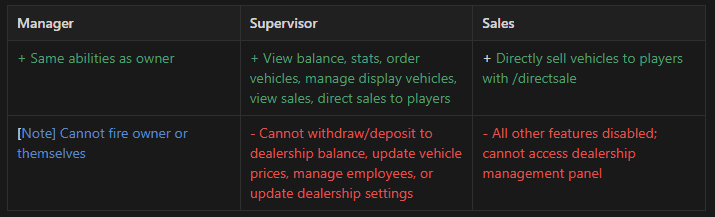
Employees can be one of three ranks: Manager, Supervisor or Sales. You cannot change this, but you can configure how this aligns to ranks for the job in your framework via framework/sv-functions.lua
Here is the permissions breakdown:
Last updated 19 July 2026