
Transferring Vehicles
Select a parked vehicle and choose Transfer. Vehicles left outside must be stored first.
Between players
Select Player, search for an online player by name or ID, then confirm. This changes ownership immediately and clears existing shares; the recipient doesn't need to accept.
Use Share to lend a vehicle instead. Borrowers can't transfer vehicles.
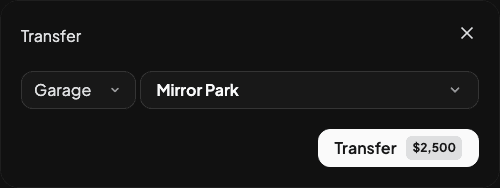
Between garages
Select Garage, choose a destination with space and confirm the fee. Set the price with Config.GarageVehicleTransferCost in config/config.lua.
Storage settings apply to existing garages too:
| Setting | Behaviour |
|---|---|
Config.GarageUniqueLocations = true | Public vehicles must be collected where they're stored, or transferred |
Config.GarageUniqueLocations = false | Vehicles can be retrieved at any public garage; public parking limits are disabled |
Config.PrivGarageStorageMode = "separate" | Private garages keep their own storage and parking limits; the default |
Config.PrivGarageStorageMode = "public" | Private garages in Own vehicles mode follow the public setting |
Shared private garages always use separate storage. Transfers between garages sharing public storage are hidden. Players still need access to the destination. Restart the resource after changing these settings.
Blacklist transfers between players
Add model spawn codes in config/config.lua:
Config.PlayerTransferBlacklist = {"adder", "thrax"}Disabling transfers
Set either option to false in config/config.lua:
Config.EnableTransfers = {
  betweenGarages = false,
  betweenPlayers = false
}
Last updated 23 September 2026