
Private & Shared Garages
Set up members, shared storage and garages for sale
Open Private & Shared Garages in /garageadmin, then create or edit a garage.
Vehicle storage
| Mode | Who can use the vehicles |
|---|---|
| Own vehicles | Each member uses their own vehicles and individual shares |
| Shared vehicles | Members can borrow each other's vehicles parked here |
| Spawner vehicles | Members choose from a configured model list |
Shared storage keeps the original vehicle owner. Borrowers can't sell or transfer the vehicle and must return it here. Only one player can have it out at a time.
With interiors enabled, Own vehicles gives each member a separate interior. Shared vehicles puts members together.
Assigned members
Choose Assigned members, then Manage members. Add players, choose their roles, click Done, then save the garage.
- Owner: manages members, invites guests and can sell a purchased garage.
- Member: uses the garage and views its members.
Give everyone the Member role to leave management to admins. The last Owner must appoint another before leaving.
Garages for sale
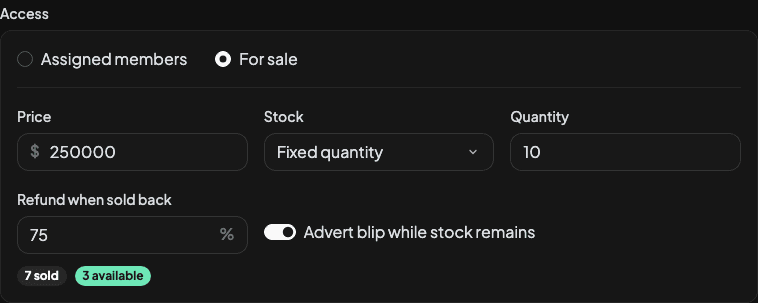
Choose For sale and set the price, stock and refund percentage. Spawner garages can't be sold.
Players buy from the entrance advert. Each purchase creates an independent garage with its own members and vehicles. Interior tour is available when an interior is assigned and the access mode allows it.
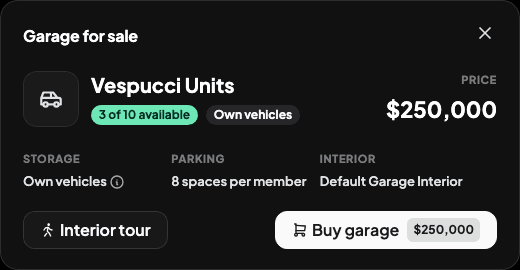
Editing the sale template affects future purchases. Existing purchases keep their settings, including the refund percentage.
Inside the garage
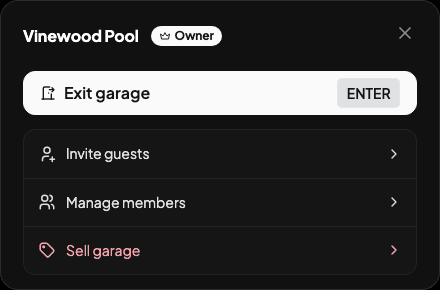
Press Escape on foot to open the garage menu. In Quick Access Only mode, use Garage menu beside the garage name instead.
Temporary guests
Owners use Invite guests inside the garage. Guests must be within five metres of the entrance and have 30 seconds to accept. They leave when their host leaves. Guest access doesn't give membership or vehicle keys.
Selling a garage
An Owner can sell a purchased garage once no vehicles are parked there, including vehicles listed for sale. The confirmation shows the refund. Selling removes the garage and its members, sends everyone outside and restores one available purchase.
Parking limits
Set limits in Admin Panel. Shared storage always keeps vehicles separate from other garages.
Last updated 18 September 2026