
Translations
Setting the language in our scripts
Every script from JG Scripts is fully translatable out of the box (except Scoreboard). Head to config.lua and update the Config.Locale option. You can find a list of available translations inside the locales folder.
The name of the file (without the .lua extension) is the value you set Config.Locale to. For example, if you see a locale file called de.lua, update the config to Config.Locale = "de".
Contributing
Translations for all our scripts are handled in the translations repository on GitHub:
Before each new release, the latest translations are automatically pulled from this repository.
We would love for you to contribute! To add a new locale file, or improve an existing one, make a Pull Request with your changes, and one of the team will review it.
Guidelines:
-
The locale file must be named with the language code, and be a lua file. For example
en.lua,fr.lua,de.luaand so on. -
When creating a new locale file, copy an existing one (we recommend English, as it's the original file created by us), and replace the translations with your own.
-
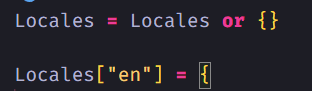
The start of the file must keep the variable declaration, and you must update the existing language code to match the name of the file.
-
Test the file before submitting your Pull Request to ensure that there are no syntax errors.
Last updated 19 July 2026